Highlight
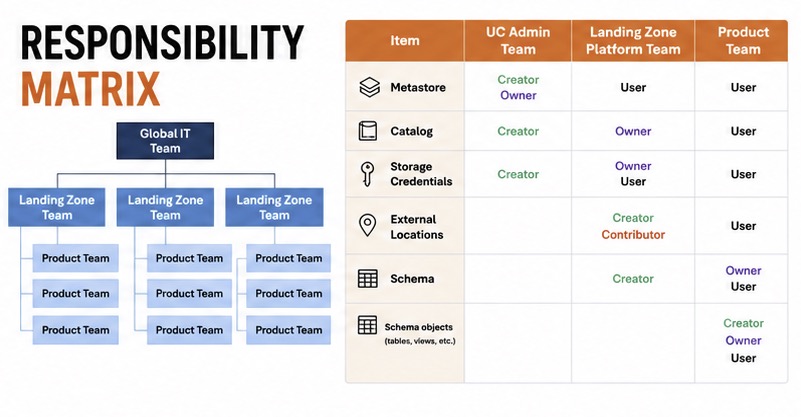
The most important migration decision was not technical. It was about teams and roles. In Unity Catalog, the wrong role model makes the whole platform hard to operate.
Lesson 1: treat the Unity account as a global asset
The challenge we faced
In Unity, the account is not a project-level object. It is tenant-level.
That means if you give someone account admin, you are giving them control over the entire organization’s Unity setup.
The solution
We created a separate global team for Unity account administration. That team was distinct from the teams that manage Azure subscriptions.
This solved two problems:
- it stopped subscription owners from toggling tenant-wide features,
- it centralized the decisions around account-level identity and security settings.
Lesson 2: define roles in logical terms
The role model we used
Instead of trying to map every Databricks permission, we defined roles in business terms:
- Owner / Creator: who creates the object,
- Contributor: who can manage the object but not grant permissions,
- User: who can consume the object.
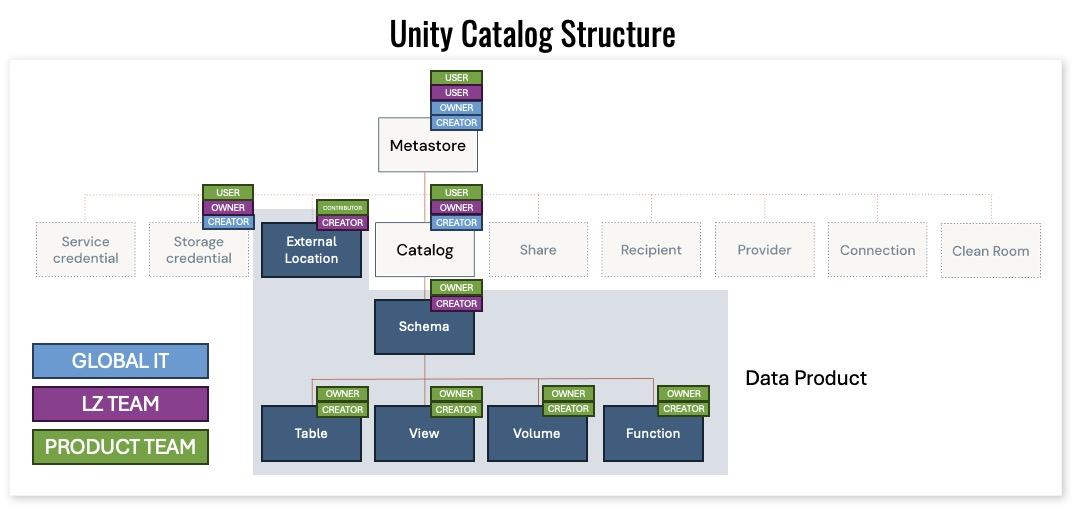
This gave us a stable model even as Databricks added new permissions.
Why this matters
As the product evolved, new Unity Catalog permissions appeared. Our role descriptions did not need to change because they were defined by function, not by specific flags.
Lesson 3: account admin is the real high-risk role
The warning
We saw that account admin is a dangerous permission. In a migration, it is tempting to hand it to the first person who needs to troubleshoot.
This is a mistake.
Account-admin-level toggles can switch features for the whole tenant. That includes things like automatic identity management and cross-cloud share settings.
Governance principle
If a team owns one subscription, they should not also own the Unity account.
Instead, keep the Unity account team separate and give workload teams the permissions they need at the schema/catalog layer.
Lesson 4: keep the role map simple
The table we used
The actual permissions in Unity Catalog can be complex, but our governance table stayed simple:
- owner / creator,
- contributor,
- user.
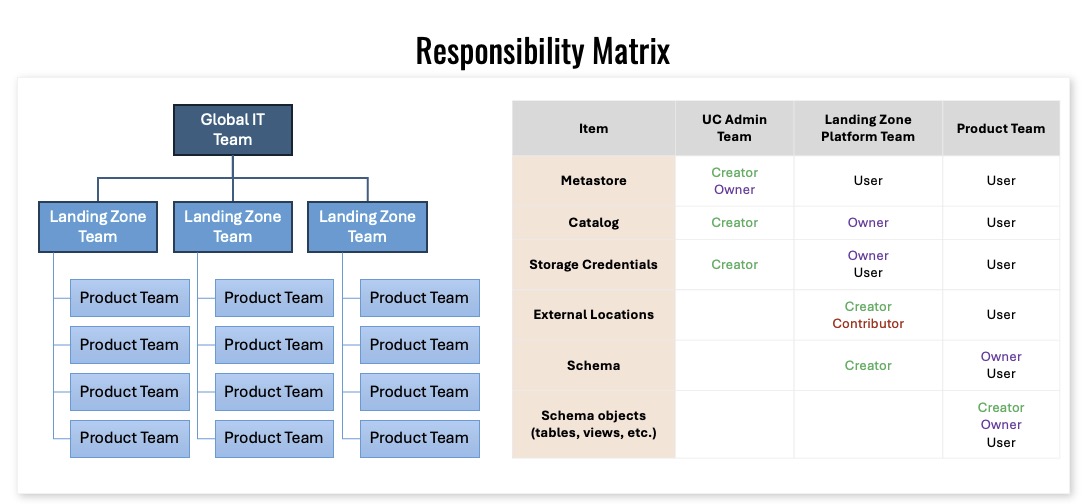
It also included notes about who can manage access versus who can only use the object.
That simplicity helped us onboard 100 projects quickly.
What to do today
When you start a Unity Catalog migration:
- decide who owns the tenant-level account,
- separate subscription teams from account teams,
- define project roles as creator / contributor / user,
- document the object scope for each team.

