We spent the last two and a half years building a new Azure data platform from scratch using the Data Landing Zone approach. After migrating thousands of workloads and managing dozens of subscriptions, I thought it would be useful to share what actually worked, what we did differently, and the honest answer to the question: would I do it again?
The problem we started with
Our old platform was a mess. One massive Azure subscription hosting over a thousand projects and a thousand Databricks workspaces. No private network. No governance structure. Just… growth without boundaries.
We got the mandate to rebuild from scratch. New platform, new rules. Private network in mind, proper policies, real governance. And we had to migrate all of it.
That’s a multi-million dollar project. That’s also the kind of problem Data Landing Zones are designed to solve.
What are Data Landing Zones?
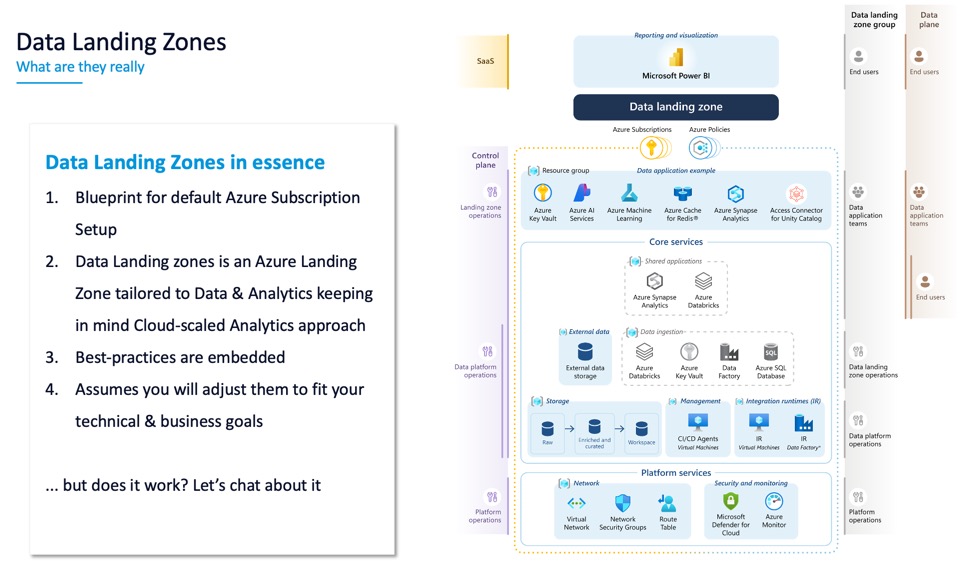
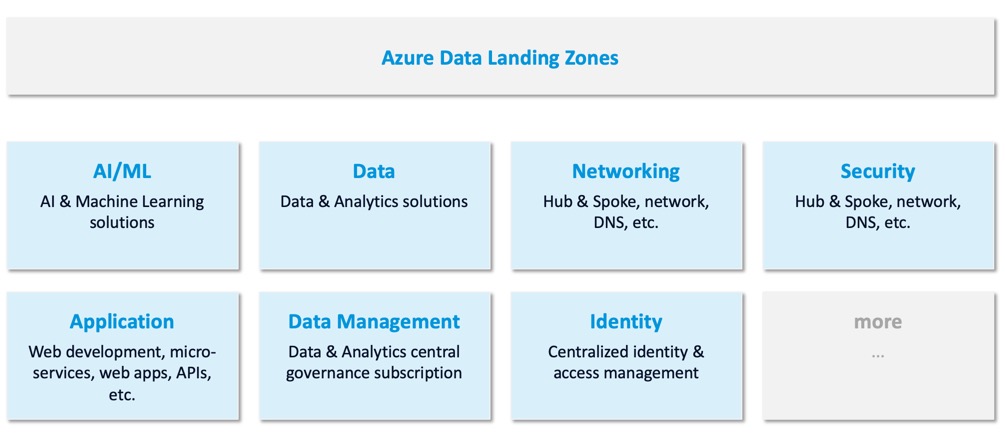
Let me tell you what Data Landing Zones are not: they’re not a single service you deploy. They’re not a tool you buy. They’re a blueprint for Azure. Specifically for the data analytics area.
The Cloud Adoption Framework documentation on Data Landing Zones is comprehensive, but it’s also massive. The whole CAF is roughly 5,000 pages at this point. No one reads it all. The idea is to know where the info is and apply what makes sense for your organization.
The core premise: as you grow and add hundreds of projects, you don’t want to fail on the basics. You don’t want to hit networking limits. You don’t want to have governance chaos. You don’t want petabytes of siloed data you can’t manage.
Data Landing Zones give you a repeatable pattern so that when you scale, scaling itself doesn’t break you.
The overhead argument
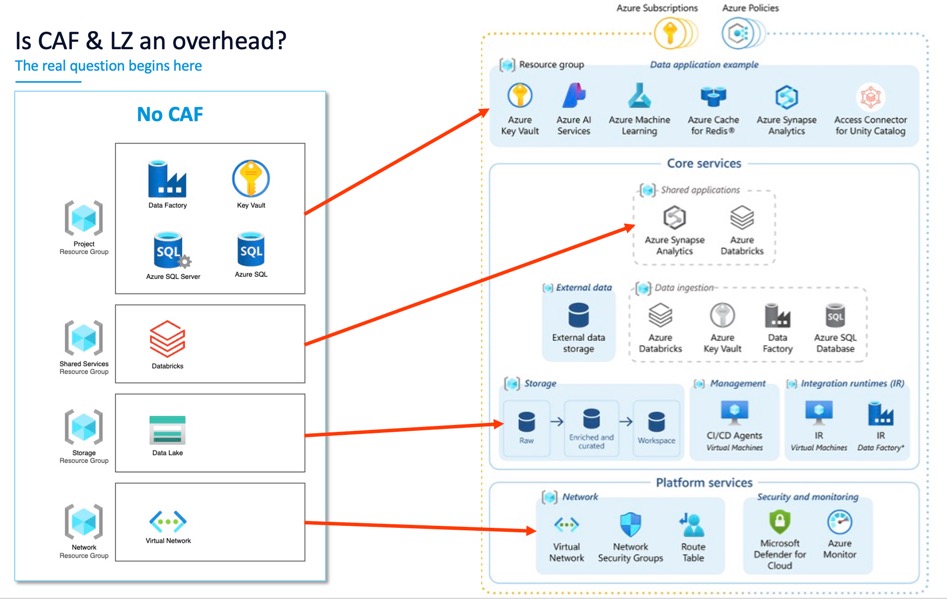
When people first see a Data Landing Zone design, they think: “Four Resource Groups for one project? That’s overhead.”
Yes. And that overhead is intentional.
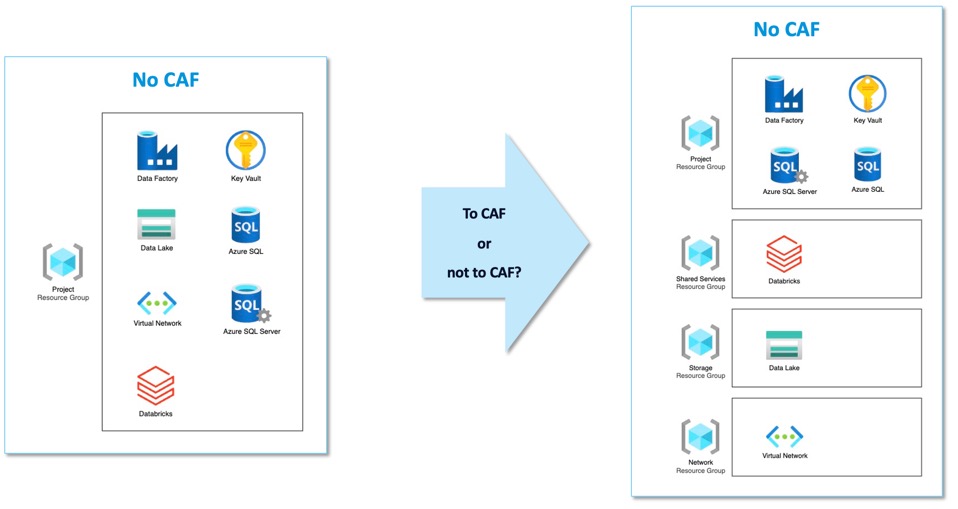
Here’s the thing: the overhead is mostly in the learning and setup. Once you build it the first time, you quickly realize why four RGs matter:
- One for networking (managed by infrastructure team)
- One for shared services (like integration runtimes)
- One for data (central lakes)
- One for compute (workspaces, clusters)
Different teams can manage different parts. You can apply different policies to different RGs. You can audit costs and access by layer. That’s not overhead, that’s architecture.
Our actual implementation
Where we are today
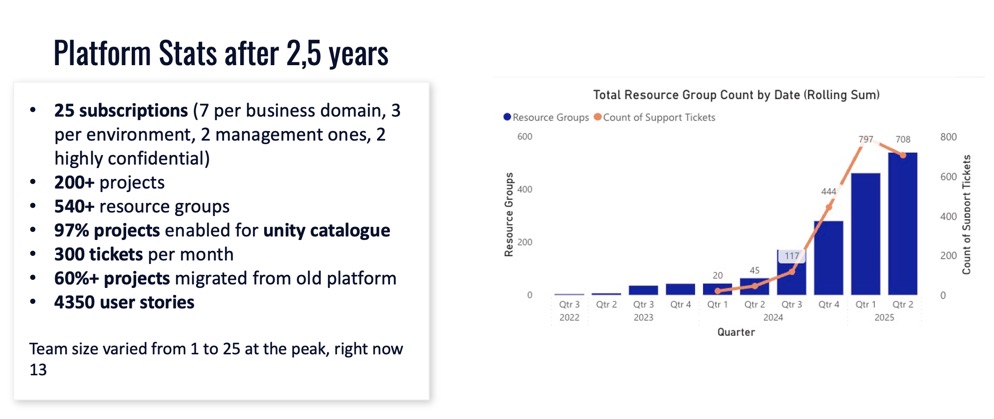
After two and a half years:
- 25 subscriptions in the new platform (subscription count is a governance choice; some clients go with 5, others with 100+)
- 60% migration complete of the old workloads
- Almost a year spent just building the platform foundation
- Late last year we ramped up the migration pace
One important decision we made: we did not go with subscription vending. Some organizations give a subscription per project (three environments = three subscriptions per project). In the data analytics space, I don’t recommend that. You’ll have too many subscriptions to manage, and you lose the ability to share infrastructure efficiently.
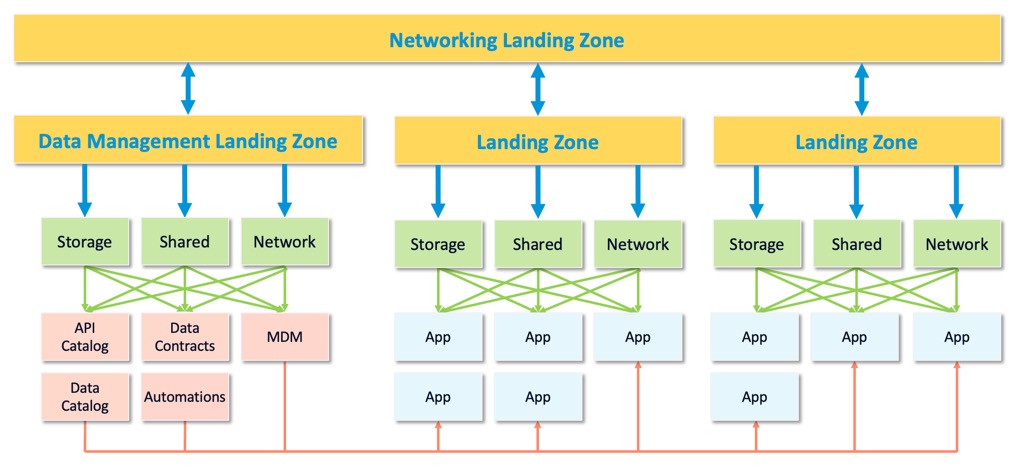
And how does it look like for us?
The networking layer: selective peering
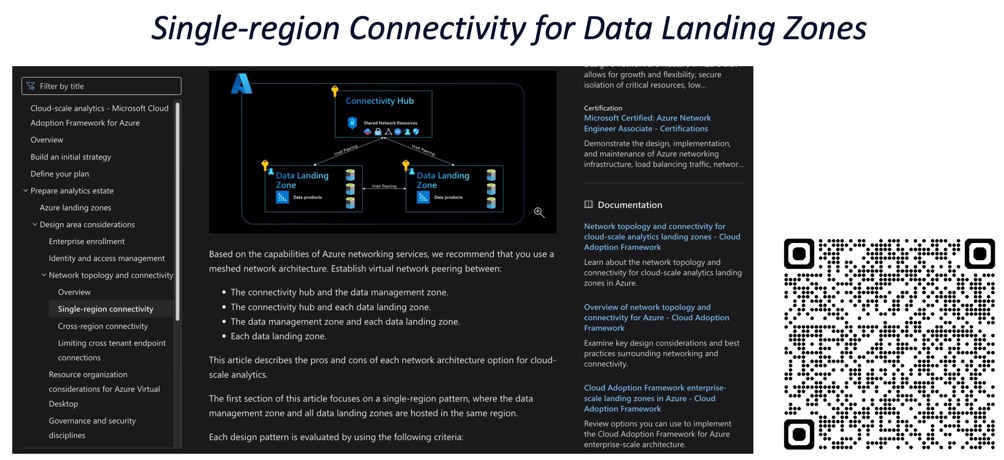
The CAF documentation recommends Full Mesh networking for Data Landing Zones. In theory, everything peers to everything.
I partially disagree with this approach at scale.
Here’s why: if you have 500 subscriptions, the math of “500 * 500” peerings hits Azure limits. From a security perspective, one big flat peered network is also a risk, lateral movement becomes too easy.
What we did instead: Selective Peering. Subscriptions that have the biggest data sets peer to each other. Smaller projects connect through a hub when needed. It’s not pure Full Mesh, but it controls costs and improves security posture.
The lesson: Microsoft’s guidance is solid, but you have to make your own judgment calls on the last 20% based on your scale and your risk appetite.
Storage: centralize the data
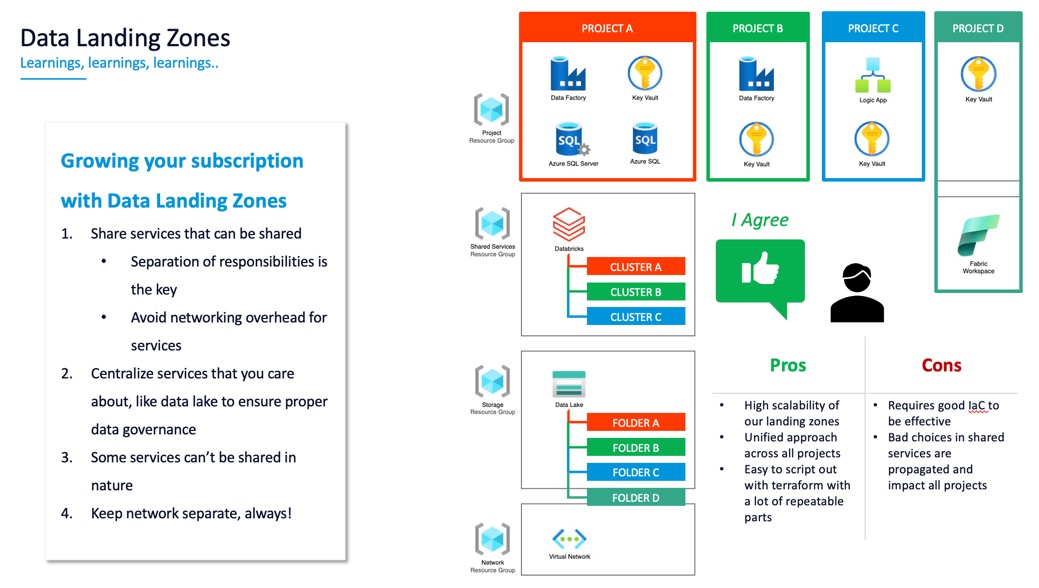
Data Landing Zones say: put storage in a separate Resource Group, managed centrally.
I agree with this one hundred percent. Don’t give every project its own data lake. You’ll end up with petabytes of siloed data scattered across the org, and good luck finding it later. A central data lake, with projects granted access to their folders, is much better for cost and governance.
Shared services matter
Here’s a practical example: Databricks workspaces.
If you give every project its own workspace, every project needs two subnets (one for workers, one for infrastructure). With hundreds of projects, you’ll run out of IP addresses. You’ll also have a management nightmare keeping patches and security controls aligned.
Shared Databricks workspaces, with project-level isolation and RBAC, scale much better. One workspace serves multiple projects. Same with Integration Runtimes, don’t give every project its own IR. If they’re connecting to the same on-premises source, share one. Manage it centrally.
CI/CD and private networking
In a private network, you need privately hosted agents for CI/CD. This is a hard requirement, you can’t reach public DevOps endpoints from an isolated network.
We put agents in their own Resource Group, managed centrally. That said, newer managed agent pool capabilities in Azure DevOps might make this RG pattern less necessary in the future. Worth watching.
Deny assignments and deployment stacks
One thing I love about Data Landing Zones: the idea of Deployment Stacks.
You can use Deny Assignments to prevent teams from modifying critical infrastructure, like route tables, even if they technically have subscription permissions. It’s a nice middle ground between open access and absolute lockdown.
Scaling through infrastructure as code
Here’s where Data Landing Zones really shine: when you have this diagram, everything fits like Lego blocks.
To provision a new project, you:
- Allocate a subscription (or place it in an existing one)
- Give it a cluster in the compute layer
- Give it a folder on the central data lake
- Wire up the networking
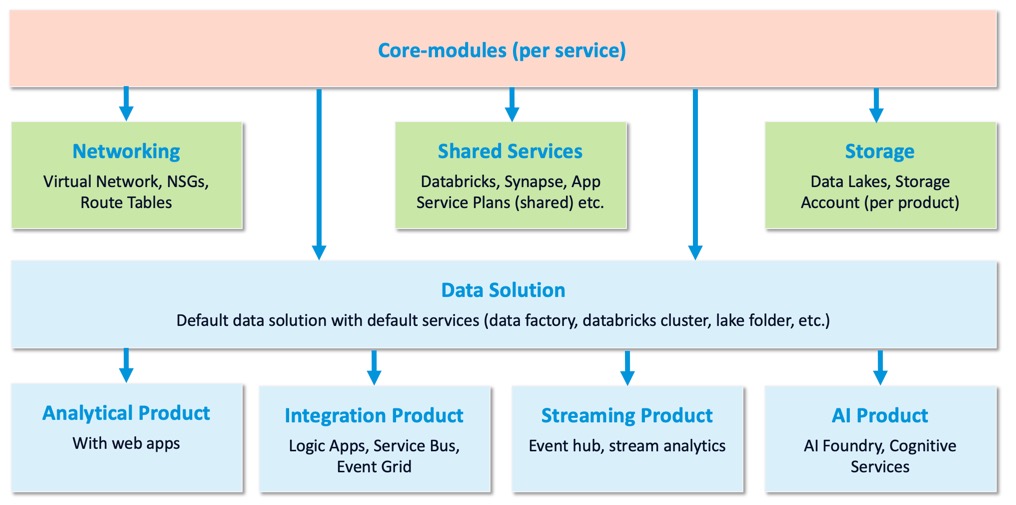
It’s a repeatable pattern. We built our Terraform modules to match this structure:
- Core modules: one per service (storage, compute, networking)
- Layer modules: one per logical layer (networking, shared services, compliance)
- Solution templates: one per type of project
This way, if Microsoft changes an approach or a service evolves, we only change it in one place. The change propagates down to every new deployment.
That’s how you scale without chaos.
Key decision points we faced
Subscription count
We settled on 25 subscriptions for our portfolio. That’s a balance between:
- Keeping related projects together (cost tracking, policy application)
- Not having so many subscriptions that management becomes a nightmare
- Respecting Azure’s role assignment limits (you hit ~2,000 fairly quickly at scale)
Your number might be different. But make that choice intentionally.
Hub vs. Mesh networking
As I mentioned, we did selective peering instead of full mesh. This saved us on:
- Azure peering costs
- Blast radius if a network is compromised
- Operational complexity
Central vs. distributed data storage
We went fully central. Every project stores its data in the central lake. We control access through RBAC. This is simpler than the alternative (distributed ownership), but it does require strong governance discipline.
Would I do it again?
Yes. Absolutely.
The Data Landing Zone approach is solid. We got about 80% right just by following the docs. The other 20% required judgment calls on networking costs, security trade-offs, and operational complexity. But those are your choices to make based on your organization.
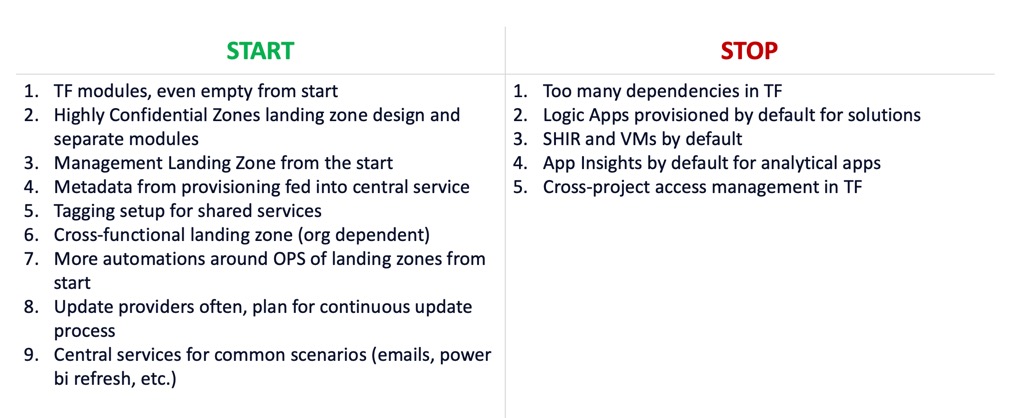
Here’s what I would do the same:
- Start with the CAF guidance
- Understand the “why” behind each design decision
- Make your judgment calls on the 20% where your org is unique
- Build Terraform modules that match the pattern
Practically speaking, if you’re building a data platform and you’re worried about scale, Data Landing Zones give you a head start. It’s not a guarantee of success, but it’s a blueprint that’s proven at scale.
Docs I recommend
- Data Landing Zone on Cloud Adoption Framework
- Subscription Decision Guide
- Network Topology and Connectivity Guidance
- Deployment Stacks
- Integration Runtimes in Data Factory
- Private endpoints and network isolation
- Role-Based Access Control in Azure
Next steps
If you’re building a data platform:
- Start small. Pick one project and use it as a pilot
- Use it to test your Terraform modules
- Document your deviations from the standard CAF approach
- Scale from there
If you’re already at scale:
- Review your network topology, is it aligned with your cost and security goals?
- Check if you’re sharing expensive infrastructure (IRs, agents, compute) or duplicating it
- Audit your data storage, is it centralized or scattered?
These are the levers you control once you understand Data Landing Zones.
