Highlight
If your organization needs a place to learn building and test Azure solutions, then ephemeral sandboxes might be the answer you need.
Sandboxes are a great way to enable your team to test, validate and learn but in a controlled and cost effective manner. Exposing such functionality via Teams chatbot makes it easy for the users and avoids yet another unnecessary user interface. While Azure Logic Apps connect the dots so you can do it easily with no coding or chatbot experience.
All of this can be set up in just a couple of hours, so you can quickly enable your organization even Today.
The idea
The general idea is simple
- A chatbot based on Azure Logic Apps to avoid maintenance and learning any frameworks
- Available on Microsoft Teams as a user called “Azure Buddy” to create natural flow
- Resource group creation and automatic deletion after 12 hours to ensure costs are kept in check
- User with Owner permissions so they can test as much as they need
With extra enterprise features
- In multi-tenant architecture (section a bit further down) users can also have more extensive Entra permissions to test more scenarios
- Quotas and Azure policies prevent abuse and costly resources (SKUs), but not all scenarios are supported, so be careful
- Resource providers or policies prevent use of non-authorized resources
- Preconfigured sandboxes via terraform or bicep
Single tenant architecture
Here is a high-level diagram of proposed solution
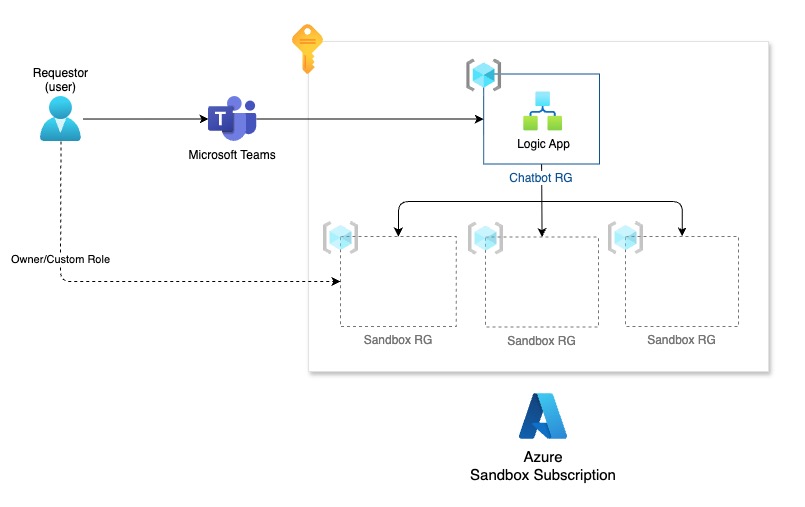
With the following components
- Microsoft Teams as a chat interface
- Azure Logic App to act as a ‘chatbot’ via workflows and teams connectors
- Azure Subscription where we will host our sandbox resource groups
Lower level diagram
I omitted Entra objects in the first diagram to avoid confusion, but now that we covered it let me add Entra to the picture to help you understand how this flow looks closer
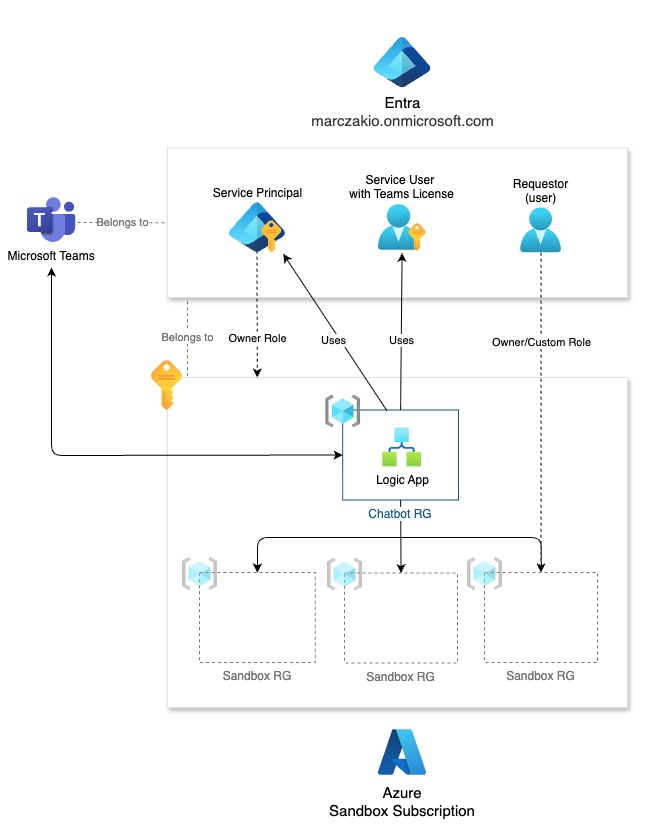
In Entra, we get
- Service Principal with Owner role on Sandbox subscription so that we can create, delete resource groups and manage permissions to them
- Service User (user account with MFA) and Microsoft Teams license (why not Service Principal? check next FAQ section)
- Requestor, an actual user who will request an Azure sandbox via Microsoft Teams
FAQ
Here are the most common questions I get asked about this setup
Q1: Why not use an AI agent for this?
We don’t need AI everywhere. While AI could be a cool option here, I prefer a regular chatbot with checkboxes instead of full text chat here. AI Agent would be a very good choice if you have more options, and/or if you need to ask a lot of extra details from our users, e.g. names of resource groups, regions, etc. In that case low-code agents in Logic Apps would be my preferred option. I promise I will cover this in a future post.
In short, I wanted this to be super simple.
Q2: Why a user with a Teams license instead of Microsoft Graph with Service Principal?
I wanted to keep it simple and allow for quick implementation, but most of all, Microsoft Teams connectors do not support service principal authentication. You would need to code this yourself.
Q3: Why not use bot channels with Azure Bot Service?
This would be a top notch solution, and I did this in the past. But it works a bit differently and bots are available only on teams they were installed in. Also the flow feels less natural compared to a user which is available globally in teams and to which you speak to like any other user.
Q4: Why service principal instead of managed identity?
Technically, no reason. This setup can work with service principal or managed identity. I used service principal because it also shows in the “App Registrations” where I can ClickOps the permissions and screenshot it, but managed identity will work too.
Q5: Why single subscription instead of multiple?
Some smaller organizations do not have Management Landing zones, but if you do, it would be a great place for such logic app automation, otherwise I wanted to make sure that anyone can leverage this in their environment.
Q6: Does this support MFA?
Yes! That is the big benefit of using logic app connectors, they support MFA and refresh tokens so you don’t need to worry about that.
Workflow
Here is a screenshot of my logic app, with end-2-end description for each step
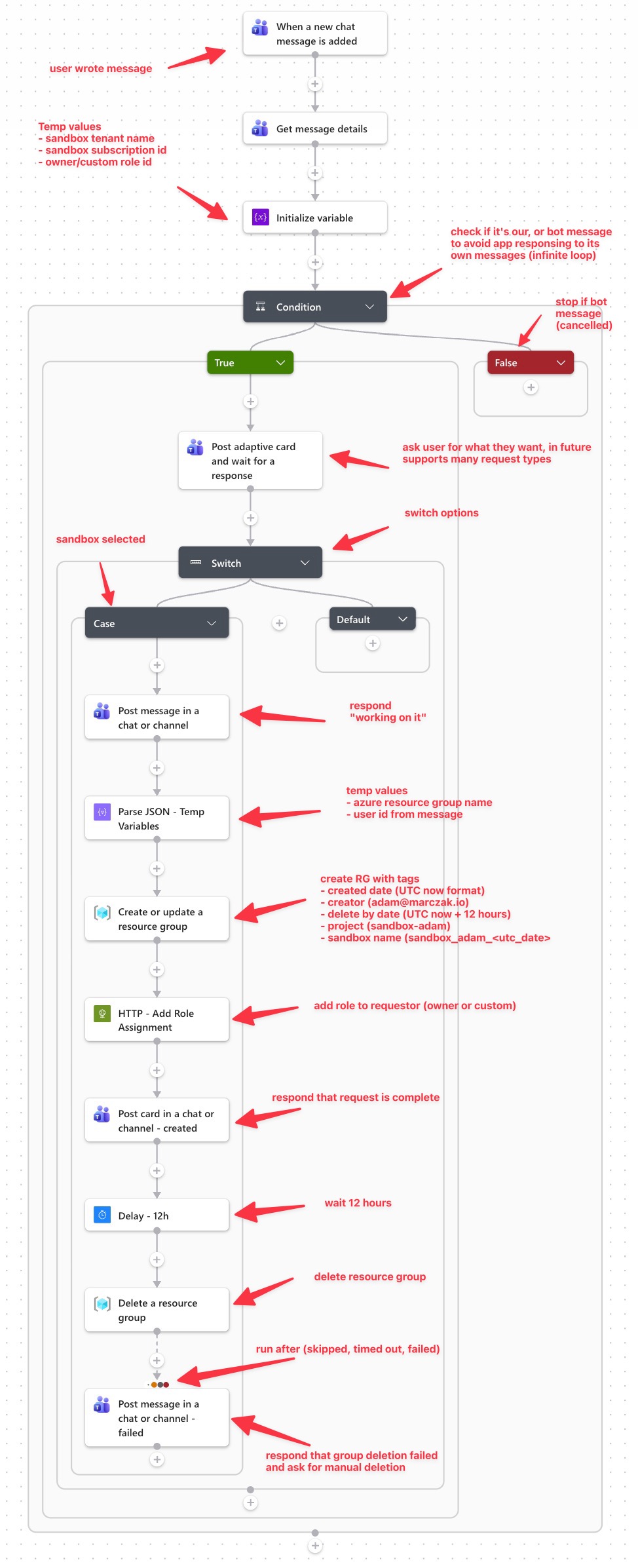
Source code: https://github.com/MarczakIO/marczakio-samples/blob/main/2026/2026-07-azure-sandbox-chatbot/logic-app.json
Testing the chat
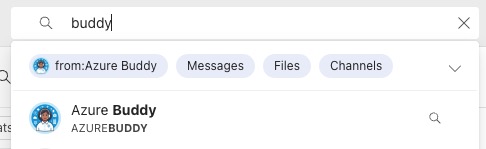
Search for your user in teams. Mine is called “Azure Buddy”
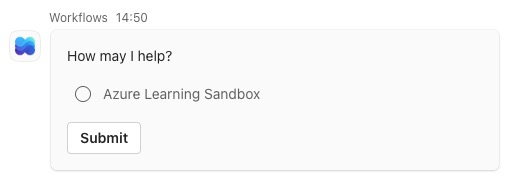
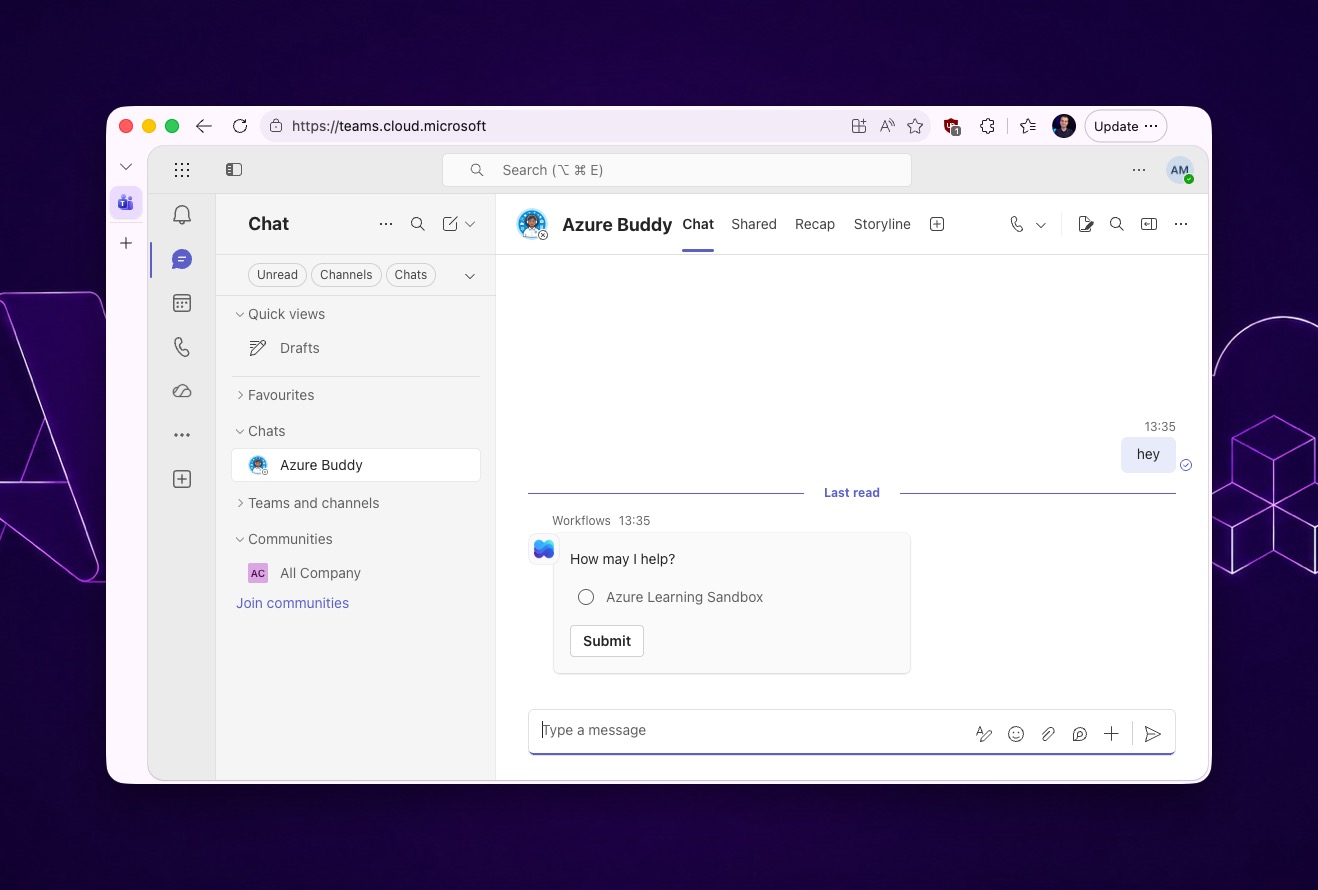
Say anything to the bot, like hi to start the workflow, and click on desired option.
Today I have
- Azure Learning Sandbox
- Fabric Sandbox Capacity (which I will cover in a future post)
But you can easily extend it with more options.
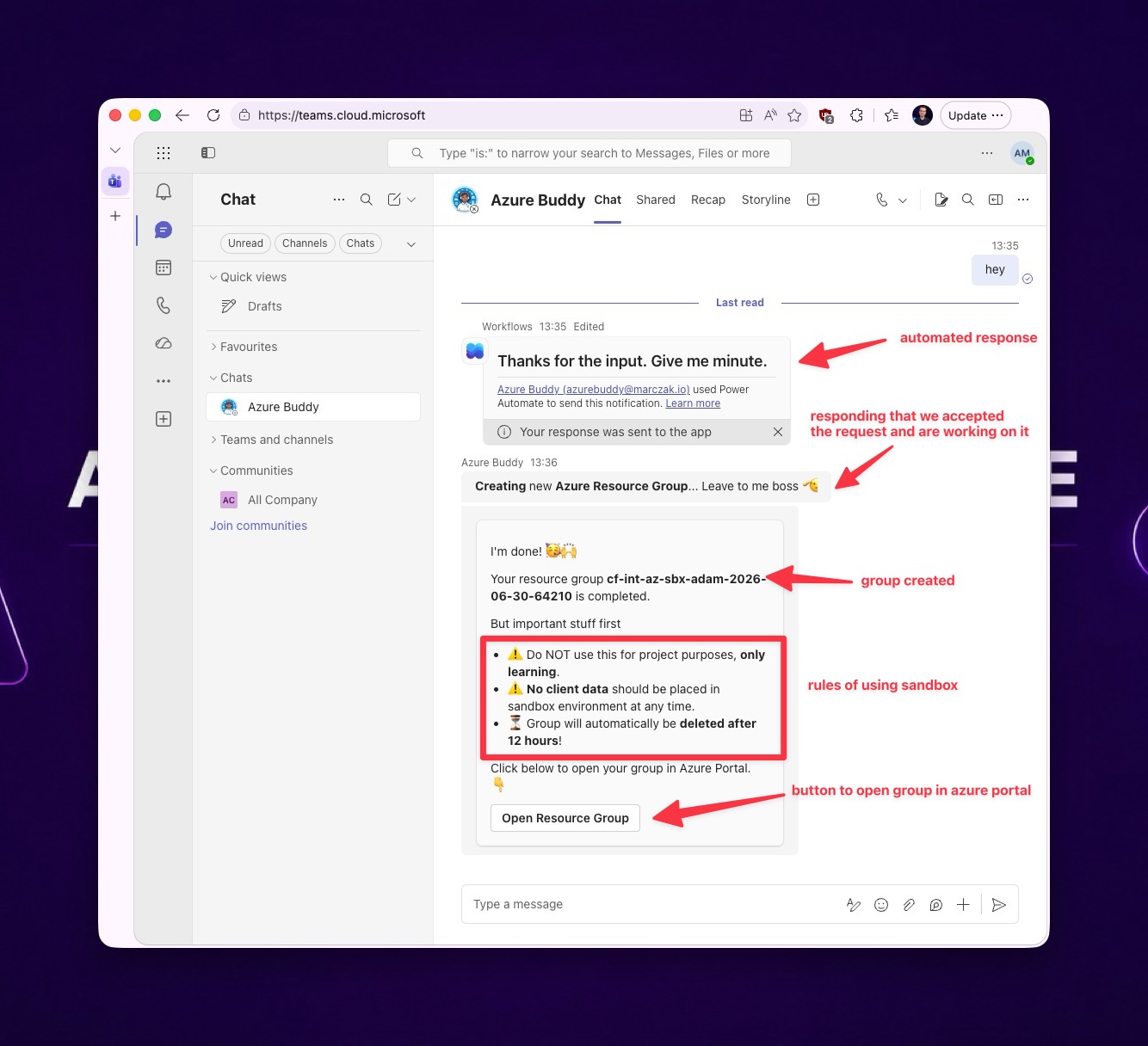
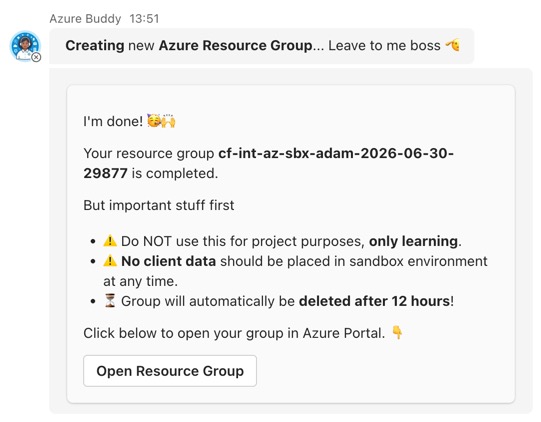
Bot will respond, create a group, and provide a link to it
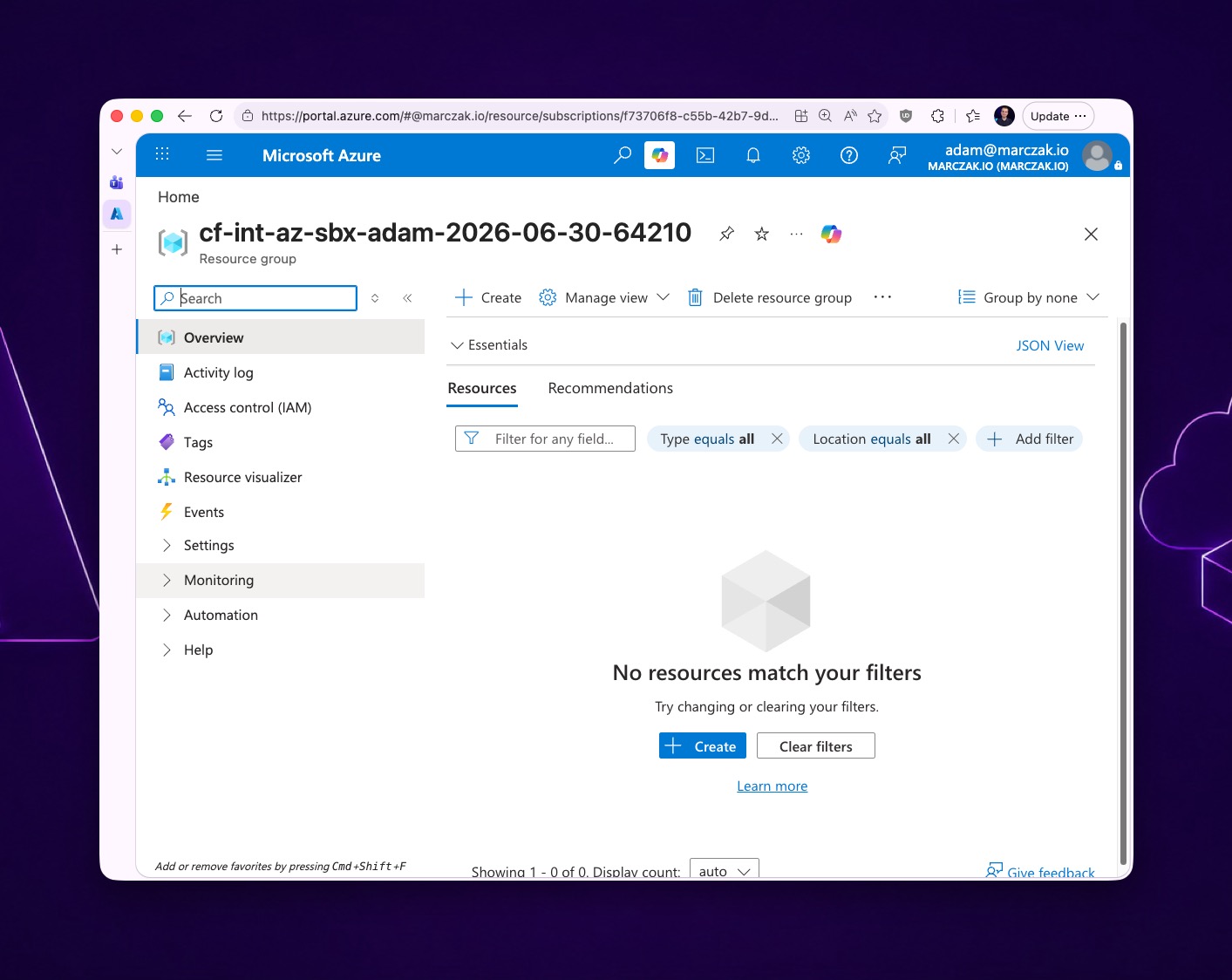
If you click on Open Resource Group button, the following Azure Portal view will be opened
Adaptive cards are cool
If you like this kind of response with interactive buttons, this is something in teams called Adaptive Cards. It’s basically a JSON formatted response which is displayed like a small form on Teams.
Microsoft has an interactive adaptive card designer for you to use. It’s available HERE.
Source code: https://github.com/MarczakIO/marczakio-samples/blob/main/2026/2026-07-azure-sandbox-chatbot/adaptive-card.json
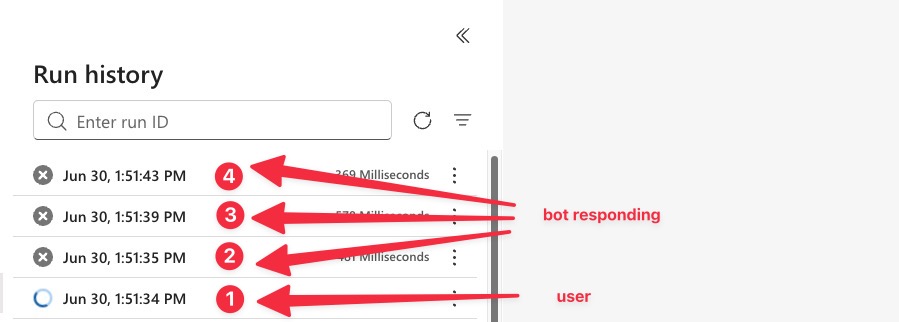
Cancelling workflow when bot responds to avoid false “successful” runs
I always add ‘terminate’ action with ‘cancelled’ status to indicate bot workflow triggers, so they don’t show up as either failed or succeeded in my logs. This allows me to easily find workflows triggered by a human.
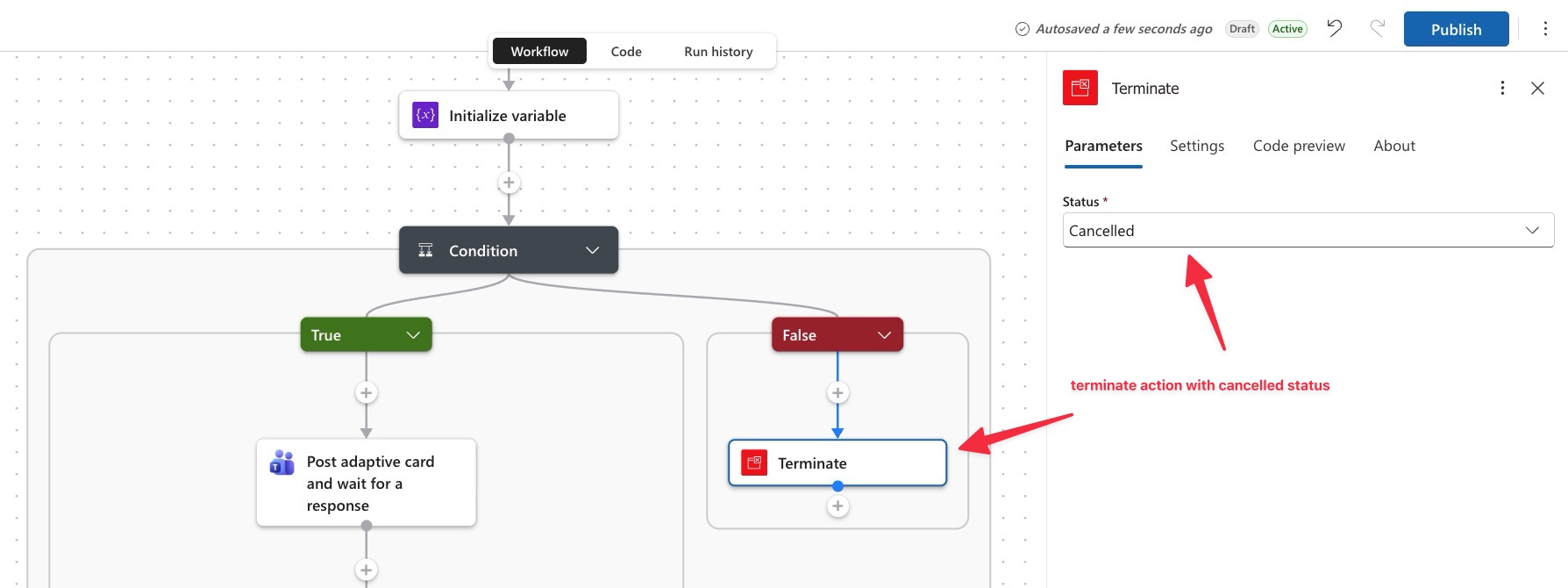
So in your chat, when you say Hi and click on option for sandbox
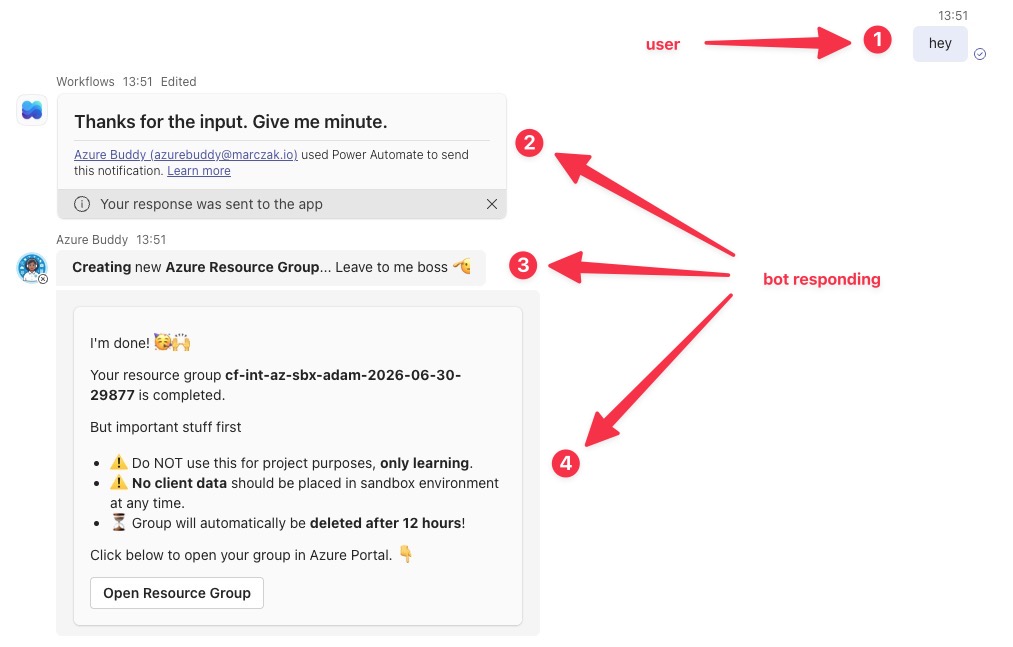
You will see following log entries (numbers 1, 2, 3, 4 correspond to messages marked respectively as 1-4 from previous screenshot)
Multi-tenant setup
While the previous setup is step one, I typically recommend everyone who can to set up multi-tenant sandboxes. In this case, setting up a separate Microsoft Entra tenant allows for more flexibility.
This is mostly because in many organizations your main Entra tenant is locked and heavily controlled.
For many Azure sandbox testing/learning scenarios you might need access to Entra, for scenarios like
- Creation of service principals
- Assignment of graph/api/exchange/etc. permissions
- Enterprise apps setup
- Creation of demo users and groups
- Account level changes in Azure Databricks
- Setting up SSO integrations like Databricks SCIM
- and many more…
Separate tenant allows you to grant higher permissions to users without creating a risk for your organisation.
Important note: do NOT grant admin permission on sandbox tenant to users, it’s good for them to learn how to set up things without being highly privileged. They could also potentially break the whole setup.
Multi-tenant architecture
Below an architecture diagram for multi-tenant setup
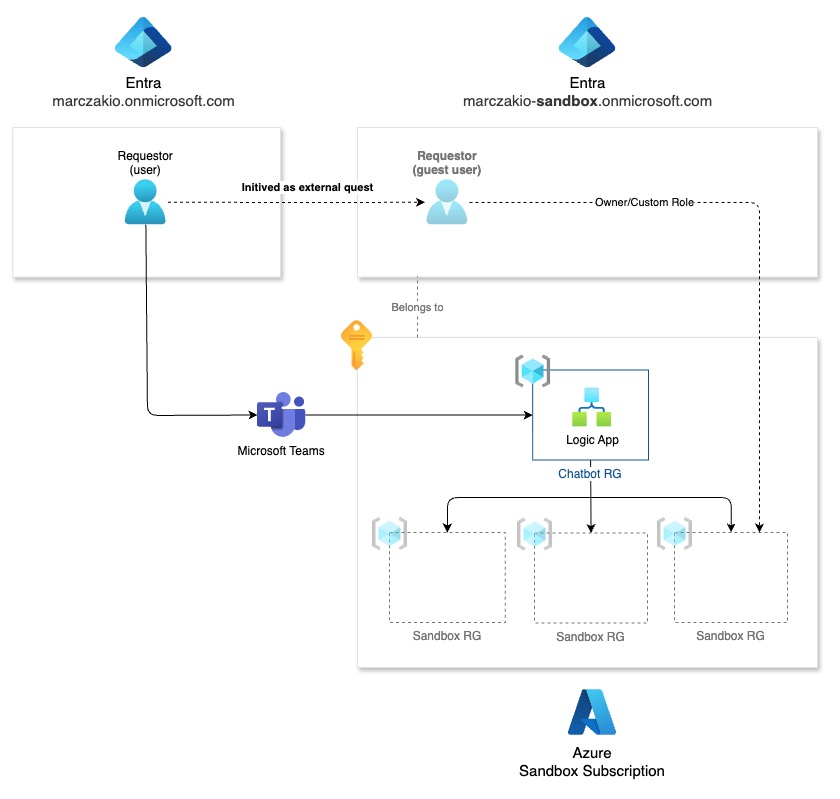
With a few changes to previous one
- A new Microsoft Entra tenant was created called marczakio-sandbox
- Azure subscription moved from marczakio tenant to a new marczakio-sandbox tenant
- Logic App chatbot was moved along with the subscription
- Logic App has extra permissions
- User.Invite.All to add users from marczakio to marczakio-sandbox tenant as external guests
- Logic App has extra steps to add user as guest, before granting permissions on sandbox RG
Lower level diagram
In a lower level diagram, again, we are showing how new tenant entra objects correspond to each other and the whole setup.
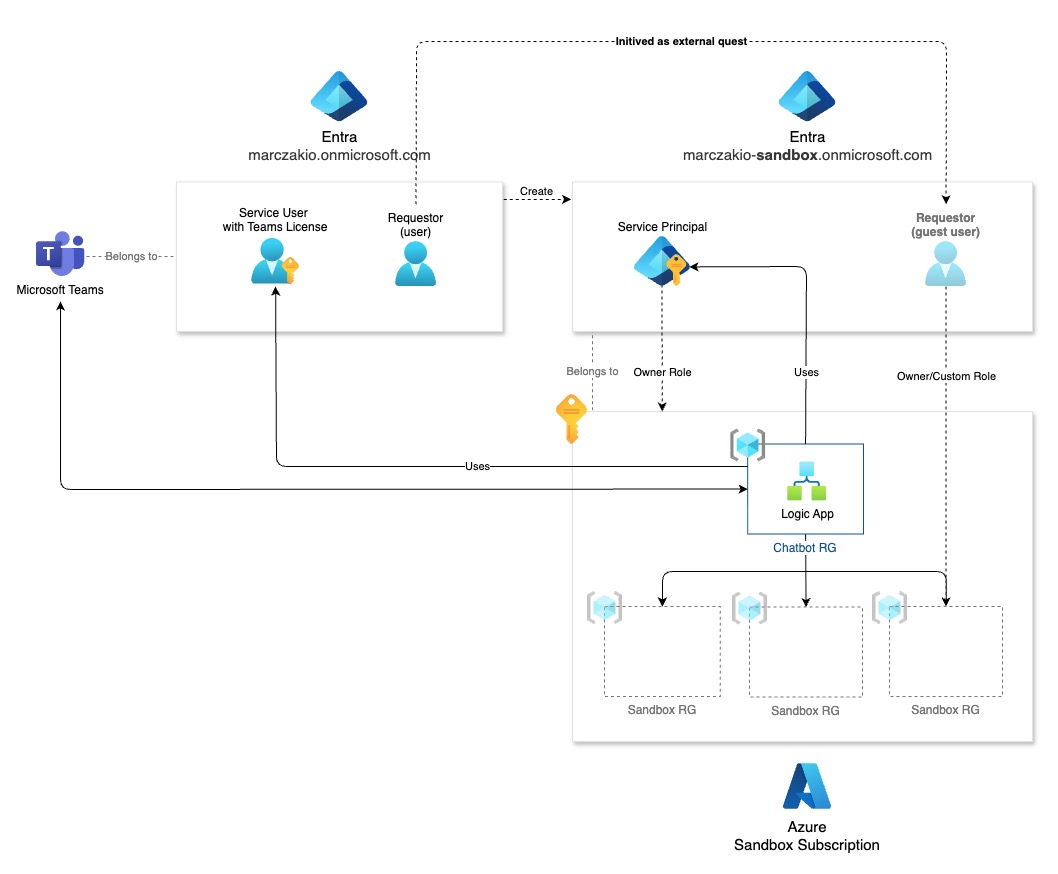
Things worth noting
- Microsoft Teams is in the main tenant (this is where users are)
- Teams licensed user is still in main tenant (same as MS teams)
Invite user to your sandbox tenant
Inviting user to sandbox tenant is fairly straightforward as it is a simple REST call with 2 parameters
POST https://graph.microsoft.com/v1.0/invitations
Content-type: application/json

{
  "invitedUserEmailAddress": "[email protected]",
  "inviteRedirectUrl": "<doesn't matter as it's a silent invite>"
}
In logic app, we do it through HTTP action
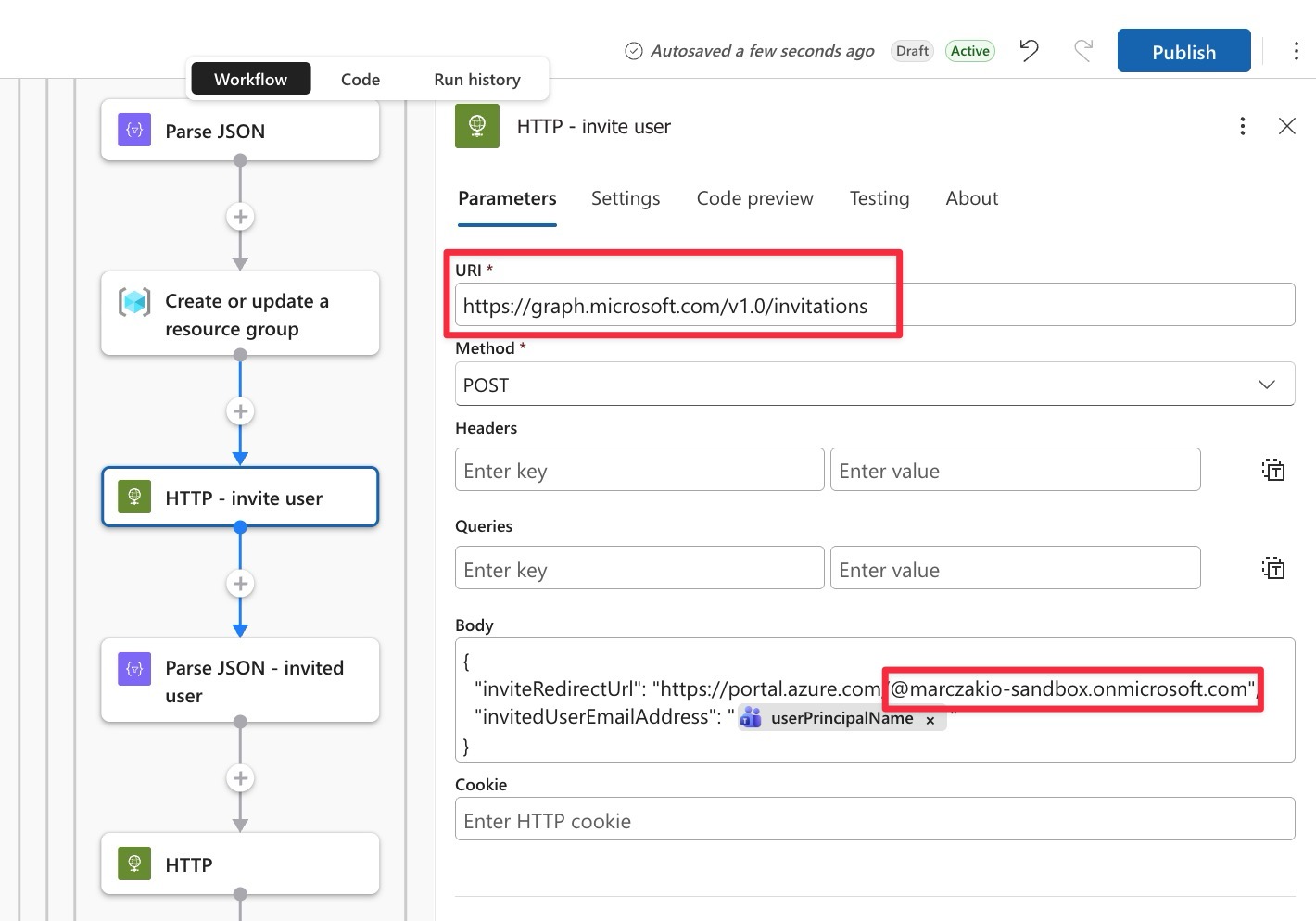
With the following required API permission

Docs
You can use official documentation to review how invitations work and how you can further parameterize this request
API Reference: https://learn.microsoft.com/en-us/graph/api/invitation-post
Enterprise Setup
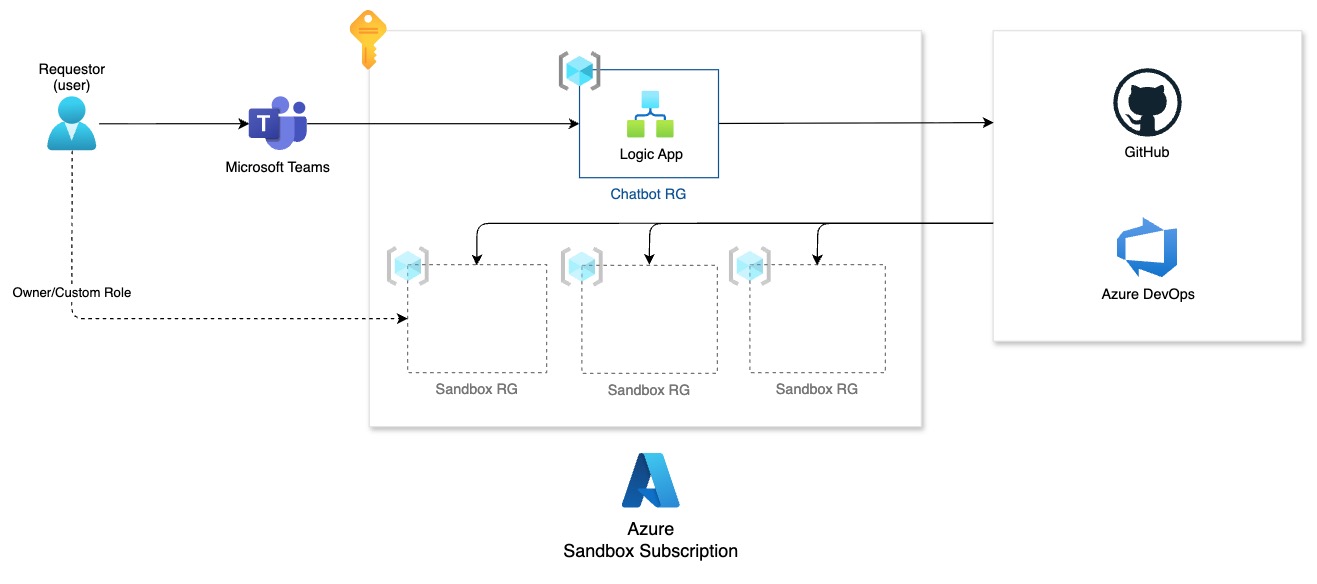
In an enterprise setup your users might have issues deploying resources on their own because of org policies. In such a case I recommend setting up Azure DevOps or GitHub pipeline with your Bicep/Terraform templates and executing that pipeline from the logic app.
Terraform/Bicep via pipelines
An enterprise ready architecture with GitHub/ADO in place would look like this
Resource providers
Resource providers are not a security feature, but you can use them to whitelist allowed resource types to ensure no one is provisioning resources outside of the allowed list, although Azure policies can achieve the same, so the choice is yours. The upside here is that this is just simple “on/off” switch. Both are supported as connectors, so it’s fairly straightforward.
Azure Policies
Following policies are something I always use
-
Allowed SKU for resource type - to avoid user ramping up expensive resources
- SKU for VMs
- SKU for App Services
- SKU for Azure SQL Server
- etc…
-
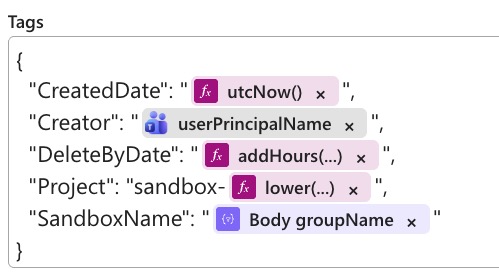
Inherit tag from resource group - to allow for granular tracking of costs
- Project Tag - to track projects/sandboxes in the same view
- Creator Tag - to track by creator
- SandboxName Tag - to track by a single sandbox
In Azure Logic App, following block was added to the tags when creating resource group
![]()
-
Allowed Locations - to ensure compliance and pick cheapest regions
- For me always Sweden Central
Cost Tracking
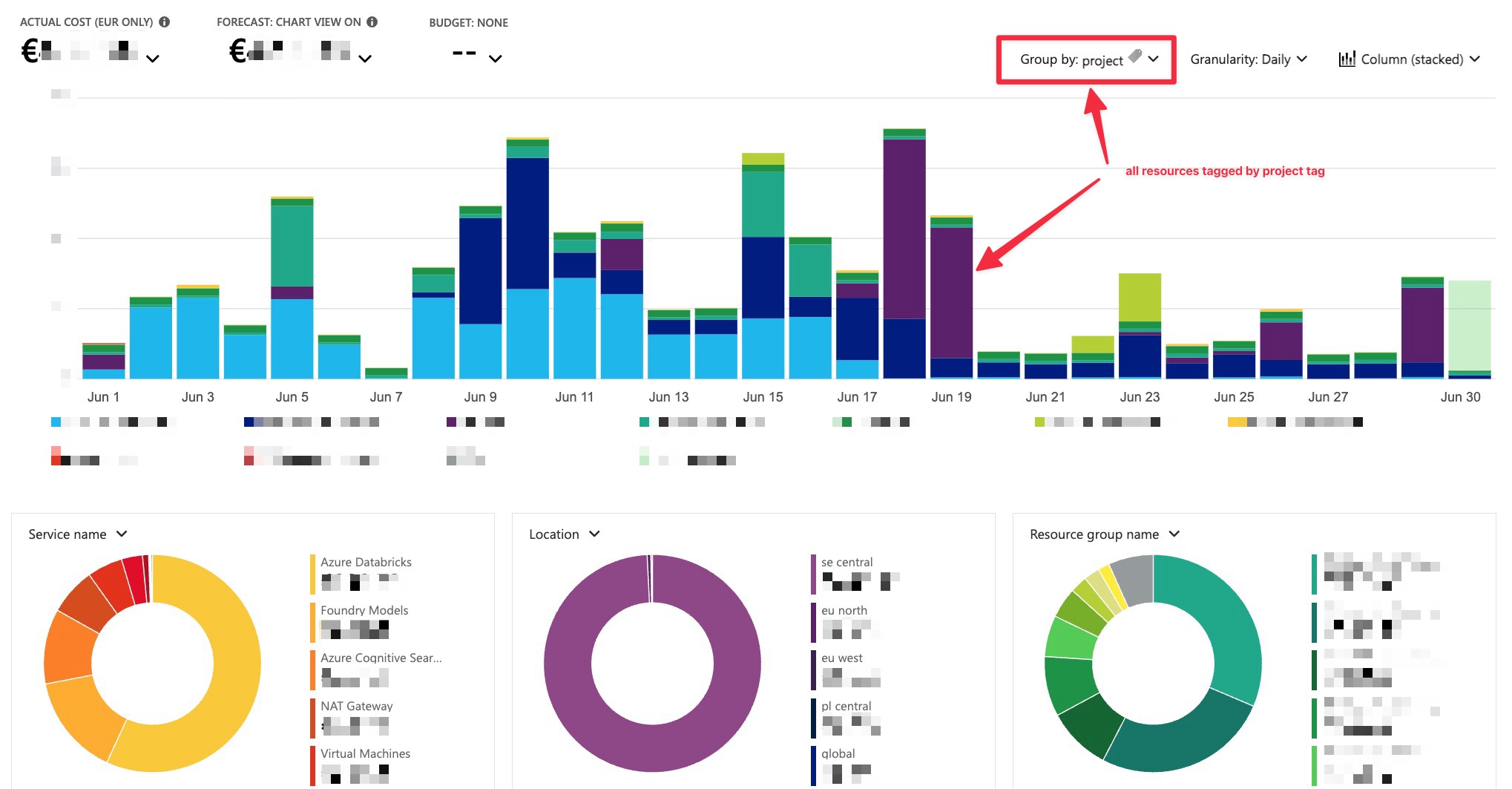
This is the screenshot I have from my subscription where I have long-term and short-term sandboxes set up
A few notes
- Ensure you have tag inheritance policy for each tag you want to track
- In Azure Logic App add tags depending on what you want to track
- Validate the costs every day for the first 2 weeks to find issues/abuse
- Azure Policies do not work on all resources, like for example Azure Databricks, so be careful when enabling these
Final Takeaway
In just couple of hours you can enable your organization to have a quick and easy sandbox solution that enables innovation, learning and many opportunities. All of that through nice and convenient Microsoft Teams chatbot.
Just make sure to check the costs every now and then!
Related Reading
- Why I Love Azure Logic Apps
- CICD for Azure Logic Apps (Standard) with Azure DevOps
- Logic App Tips: Build a Git-integration like pipeline for standard SKU logic apps
- Workflow automation with Azure Logic Apps (official overview)
- Single-tenant versus multi-tenant Azure Logic Apps and integration service environments
- Deploy and manage Azure Logic Apps Standard with Azure DevOps
- What is Azure Policy
- Microsoft Graph invitation API (B2B guest invitations)


