
Highlight
Let me tell you why I started using AI to modernize this blog. At first, it was just an expertiment, but it saved time, removed boring repetition, and let me focus on the parts that actually matter; cool examples, and opinions. :).
I’m what I call ‘positively lazy’, so I don’t want to spend time on mundane tasks, but something that provides value.
I’m not here to sell you AI, but I did use it and I’ve found it quite useful for my workflows. So this blog is exactly for that. Sharing what I did, and how it worked, the good or the bad.
Background
I run this blog using Hugo, which is a static website generator from markdown. It’s a simple yet elegant thing.
The way this entire thing is structured, makes it so my blog costs me 0$ to run by having
- GitHub pages to host my website
- Cloudflare free tier for DNS and CDN
- Disqus for comment section
- Hugo to generate website, Jeckyll is a good alternative now that GitHub has a native support for it
All of this is free. The only thing that costs me money is my domain, but that is like 12USD per year.
Challenges
Here are the top things that are annoying to me when writing a blog using Hugo
- Adding new post templates
- Adding external links to MS docs so people can follow up, and including my MVP ID in the URL
- Checking grammar
- Generating thumbnails
- Moving posts across from my second blog I wanted to decomission
- Adding necessary summaries for SEO
- Finding issues when creating hugo templates
Quick summary with personal scores
Below are tasks I’ve performed and my personal score from 1 (very bad) to 5 (excellent) how AI assisted me.
| # | Task | Score | Comment |
|---|---|---|---|
| 1 | Settup up AI to work with Hugo and my custom templates | ⭐️⭐️⭐️⭐️⭐️ | Overall it went way better than I’ve expected |
| 2 | Generating new posts skill | ⭐️⭐️⭐️⭐️ | Initially I would give it 3 stars, depending on what is your goal, but it did too much, and needed tweaking. Now it’s great overall. |
| 3 | Moving 90+ blog entries from my other blog, and changing templates for it | ⭐️⭐️⭐️⭐️⭐️ | Excellent all the way. Probably 10+ hours saved easily. |
| 4 | New navigation | ⭐️⭐️⭐️⭐️ | New buttons were like 90% there, a few small tweaks and it was there |
| 5 | Adding YouTube button for my channel | ⭐️⭐️⭐️⭐️⭐️ | One prompt and it worked. No fuss. |
| 6 | Adding recent videos section | ⭐️⭐️⭐️⭐️⭐️ | Again, this was one prompt and perfect result |
| 7 | Generate new post about Data Factory parametrization | ⭐️⭐️⭐️⭐️ | Overall great, but required tweaks to skill |
| 8 | Generating thumbnail | ⭐️ | Copilot is not the greatest to generate images. I would rate ChatGPT at 5 stars, which is what I ended up using. |
| 9 | Fixing google analytics | ⭐️⭐️⭐️⭐️⭐️ | That was just too easy |
| 10 | Adding LLMs files for indexing | ⭐️⭐️⭐️ | This required multiple prompts for AI to get it right, but in the end the result was great, and plenty of hours still saved |
| 11+ | Other small tasks | ⭐️⭐️⭐️⭐️⭐️ | Small tasks around the blog with AI, overall again, great, simple tasks are no challenge to AI |
Overall the experience was great. It was expected to be honest. All of these are simple coding tasks, and AI is already proved to be great at it.
Task 1: Setup up AI to work with Hugo and my custom templates
No bull**** here, just how it went.
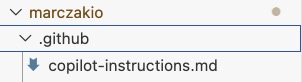
This was a fun experiment. I was generally curious how the AI will work for this. What I did was I’ve “played dumb”. So I prompted AI saying
I want to setup this project GitHub copilot, it's written in Hugo, it's a static HTML page, and all the content is in /content/posts. Also, check my current writing style and ensure instructions are set up accordingly for future posts and AI work.
Needless to say, it did an excellent job.
Result
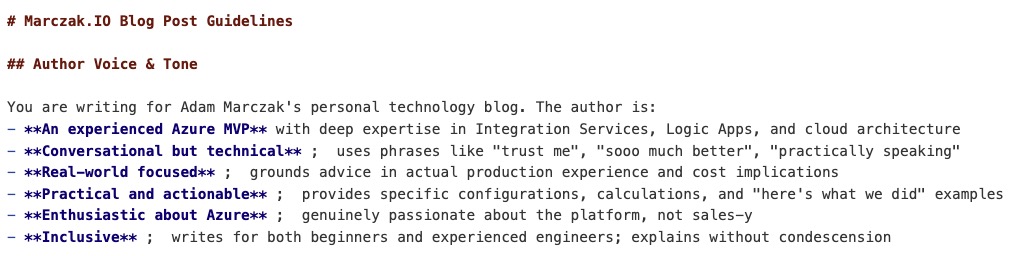
It works! This worked flawlessly, thumbs up! Author and styling was also generated, which I did not expect, but I’ve found neat. It’s surely interesting to see how AI sees your posts and their tone. I specifially liked “note salesy” part :)
What else did it figure out from my blog structure and content
- author’s voice and tone
- flow & writing styles
- avoding sales and high-level statements
- post structure
- post location
- folder structure /yyyy/mm/dd/<post_name>.md
- even my custom templates that I created my myself! big plus!
- typical sections in the post
- intro
- challenge
- solution
- read more
- links that should include my MVP ID when referring to MS Learn and Microsoft websites (?WT.mc_id=AZ-MVP-5003556)
- file naming conventions
Task 2: Generating new post
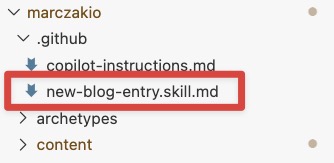
Initially I’ve generated new posts using promots, which was fine, but I’ve quickly moved to skill. Again, I played dumb, so I said to AI to generate a skill for me called “generate-new-post” which encapsulates the core info, so I can only add custom info about the post itself.
And so it did.
---
name: "new-blog-entry"
description: "Create a new Marczak.IO blog post entry in /content/posts using the repository's existing post structure and style."
---

# New Blog Entry Skill

Use this skill to generate a new blog post file under `/content/posts` that follows the Marczak.IO format and voice.

## Behavior
- Create the file path as `/content/posts/YYYY/MM/topic-name-lowercase.md`.
- Use at least 2 tags, with the primary topic first. Tags must be present in the /static/images/tags/ where tag name is a file name without extension.
- Use `featured_image` and `o_image` in front matter, and keep them the same value.
- Write `date` in ISO 8601 format with `+02:00` timezone.
- Keep the introduction short and end it with `<!--more-->`.
- Use `{ { < lazyimage src="/images/..." > } }` for images.
- Use headings and subsections that match existing blog structure.
- Add a `## Related Reading` section at the end.
- Use Microsoft Learn links with URL parameter `WT.mc_id=AZ-MVP-5003556` when linking docs.
- End with a positive actionable closing statement (no thank you request language).
- All images must go to `/static/images/YYYY/topic-name-lowercase/` folder

## Output format
Produce valid Markdown content only, with no additional wrapper text.

## Example skeleton
--
title: "Your Post Title"
date: 2026-06-05T12:00:00+02:00
tags: ["Azure", "integration"]
featured_image: "2026-06-your-topic/splash.png"
o_image: "2026-06-your-topic/splash.png"
--

Short intro paragraph. Practical hook and problem statement.<!--more-->

## Intro

Background context and what the post covers.

## The Challenge

Describe the problem or gap.

## My Approach

Explain the solution with steps or examples.

## Implementation

Add code, config, images, or architecture details.

## Related Reading
If you want to start, here are a few more cool posts too read through
- [Related post](/posts/2025/03/logic-app-tip-polling-costs/)
- [Microsoft Learn article](https://learn.microsoft.com/...WT.mc_id=AZ-MVP-5003556)


Happy building! 🚀
Result
It worked great. AI is perfect at repeatable structured tasks.
Task 3: Moving 90+ blog entries from my other blog, and changing templates for it
I’ve moved all my previous video blog posts from azure4everyone.com as I generally don’t maintain this website. But on my other blog, all of them use /posts/ structure, but here I wanted to distinct them from my typical blog posts, and make it under /videos/. So I’ve made a few prompts after moving all markdown files under /videos/.
Adding new template and URL to recognize /videos/* path
So what AI did?
It added a new section for it.
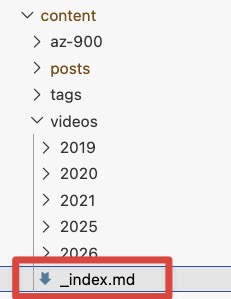
And a new hugo template to display this.
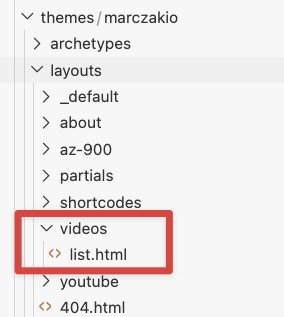
Result
Again, without a single interaction it did a great job, and my video blog posts were under a new URL migrated to a new blog.
Task 4: New navigation
Then I said to the model that
I need new buttons to navigate between posts and videos, and so that the buttons should be right above the blog content and include post and video counts
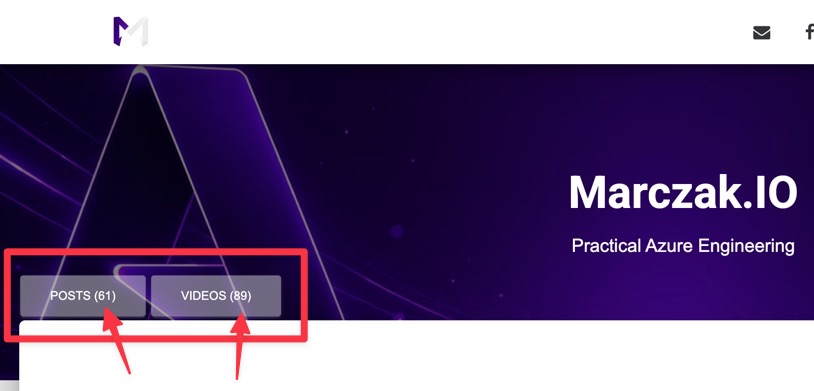
Result
This time I needed to tweak the CSS a bit, but it was 90% there. A few tweaks later, and I was home.
Task 5: Adding YouTube button for my channel
This was super easy task.
Add a button after Patreon button leading to my YouTube channel. The background color should match my background color of my blog. Add YouTube icon before the text.

It also added the appropriate URL to my YouTube without me needing to prompt it for it.
Task 6: Adding recent videos section
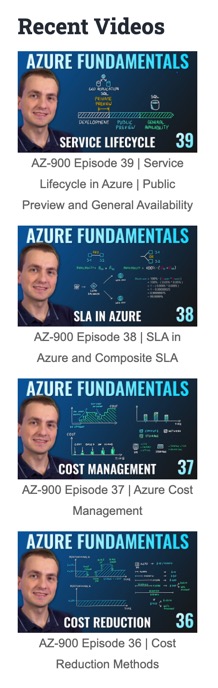
I already had a section featured videos and recent blog posts, so I asked AI to generate a recent videos section
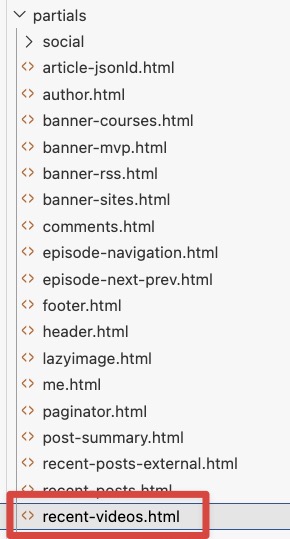
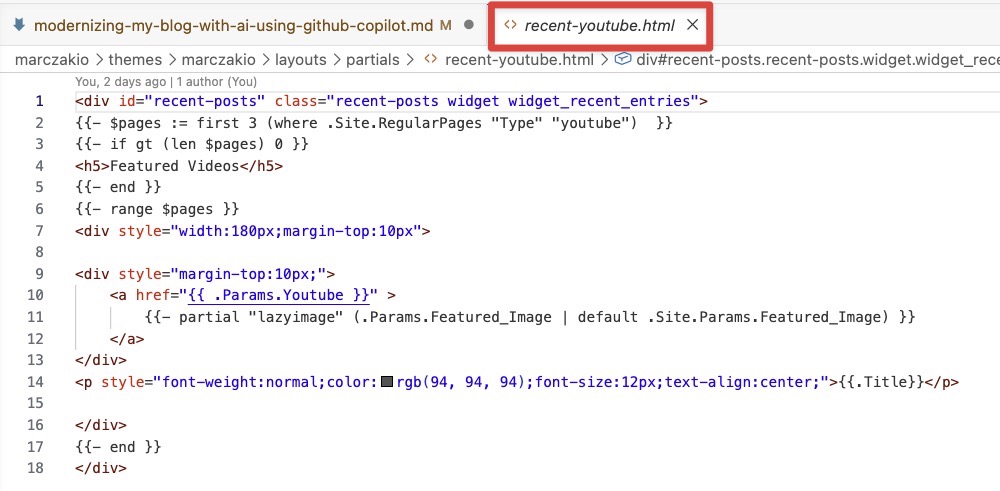
Result
It nicely figured out even the styling used in other sections. Perfect and quick addition to my blog.
Task 7: Generate new post about Data Factory parametrization
This one was a bit trickier. But did work out well.
Initially AI overdid this, because what I wanted and intended AI to do is to do the boring boilerplate work for me. Instead AI generated the whole post with entire content.
Writing as me, but not really as me. Lots of AI-like statements, no point of the post itself, just random high-level mumbling.
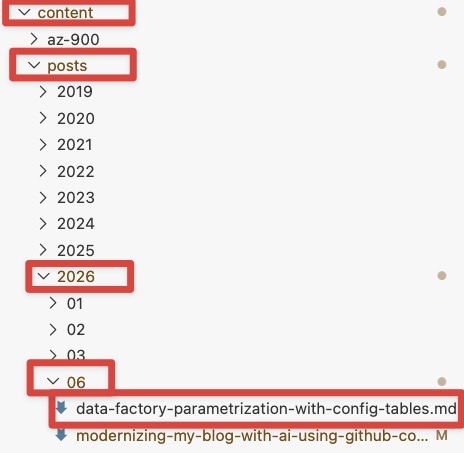
I tweaked the skill, and asked it not to generate the content and only the entry point of the blog. And then it was perfect.
Result
What worked nice
- the post was in the right place
- it figured out the general theme of the post
- it added tags, although this was hit and miss, I’ve told it repeatably to only use tags I have in my tags folder, but sometimes it randomly generates tags anyways. Which isn’t bad in case you are writing about a new topic, but isn’t perfect when you are not.
Task 8: Generating thumbnail
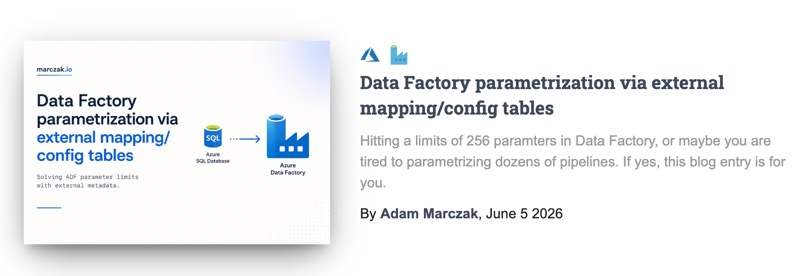
After testing multiple models like Claude, Copilot, and ChatGPT I liked ChatGPT the best. I think their drawing models are the best right now, things might change in the future, but Today I liked results the best.
Task 9: Fixing google analytics after 7 years
I’ve started this blog 7 years ago, back then I’ve set up google analytics. I never did anything with it after that time.
I remembered that there were some emails a few years back about breaking change in google analytics, so I said to AI
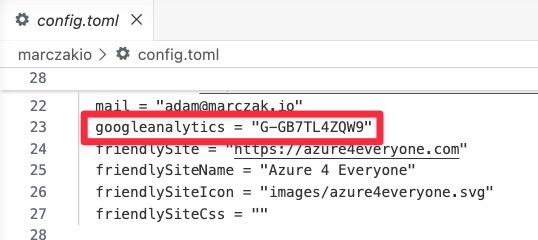
Please review current google analytics setup and recommend latest setup, fix the code too
It prompted me asking to provide it with a new ID for google analytics which apparently changed way back. I did provide it and then AI quickly fixed the HTML and code.

Cool thing is that is also recognized HUGO dynamic markup instead of hardcoding the value. So it added the value into config.toml file
Flawless experience.
Task 10: Adding LLMs files for indexing
I did read somewhere that now besides typial SEO stuff, there are extra files to help AI LLM models better understand your blog and index it. So I asked AI to do this.
It went and created the files, but it missed a few things.
So what worked well
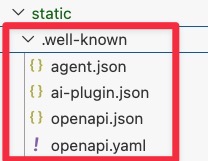
- Added .well-known path wtih good files for agents
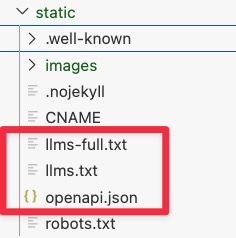
- Added openapi files and filled it with description for my blog
![]()
![]()
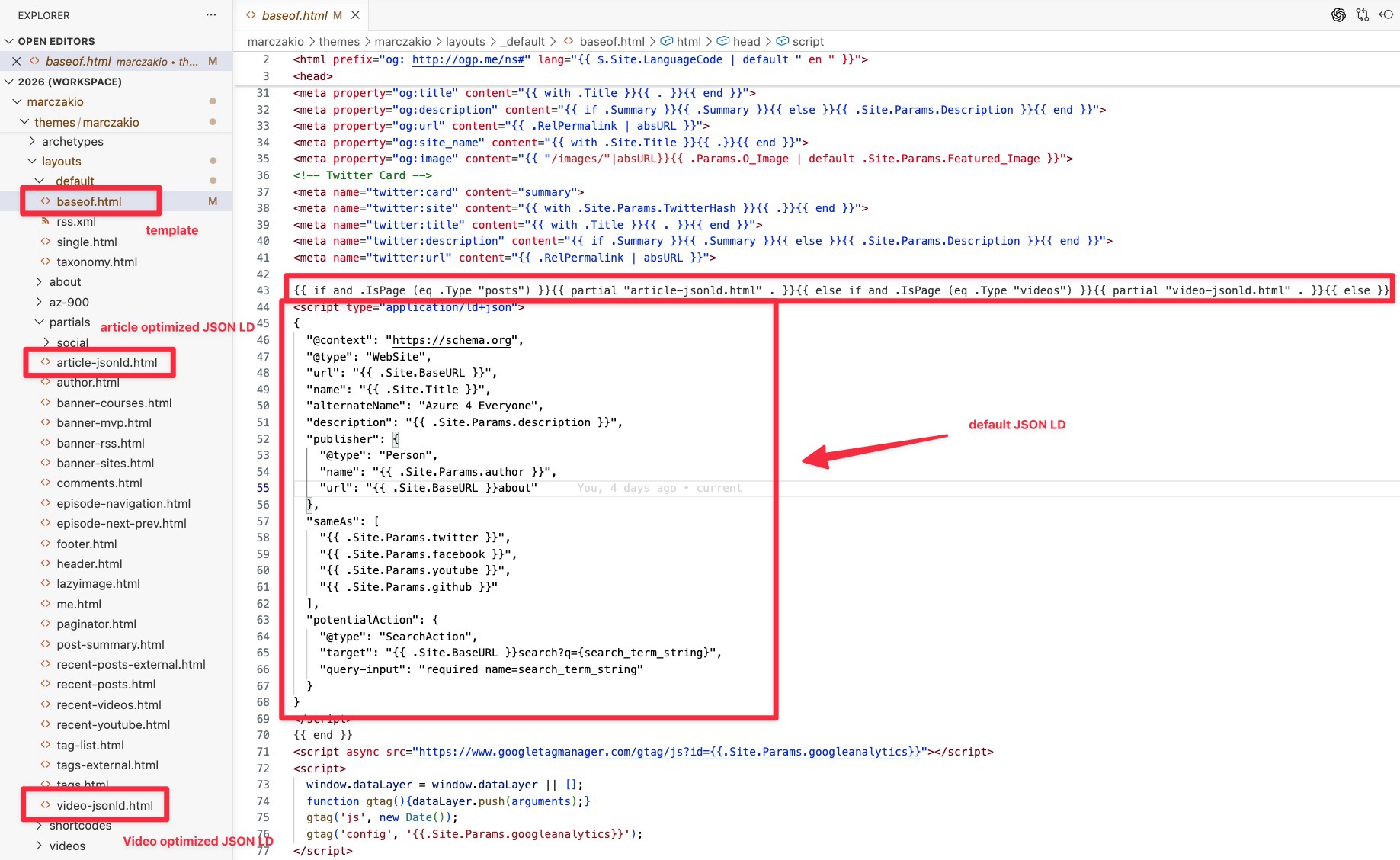
- Added JSON-LD sections to my blog, it even generated article and video optimized versions
![]()
What it missed and needed extra knowledge and guidance from my part
- Didn’t add llms.txt at first, nor llms-full.txt files
- Didn’t add posts.json file, needed extra prompts
- Files which require dynamically generated content, like posts.json were not dynamically genearated
- It broke RSS file
- When adding new files, it kept forgetting to update global files like sitemap.xml, openapi.json, etc.
Task 11-20: Other small tasks
I did plenty of other smaller tweaks and tasks, so I just wanted to make a note of this here, becasue all of this I did manage as part of the free license.
Things I did
- optimized blog for LLMs and openapi searches
- optimized blog for SEO and modern SEO recommendations
- modernized blog for latest Google Analytics package, funnily enough, I did ask it if it’s outdated, and it said yes, and fixed it, just asked me for a new GA4 ID
- optimized some pictures from PNG to JPG to lower the image size
- …and plenty more
Summary and tokens consumed
So here are the highlights from this excersise
- I’ve used Copilot Free at first, entire excersise consumed entire 1000 free tokens, which honstely, totally worth it! Now moving to Copilot Pro to see if there will be a difference, but already 7000 tokens.
- In this 1000 tokens I did
- Two (2) blog posts from scratch, but I created content myself, so it was only generating the template
- Modernized my blog HTML templates by adding SEO, LLM, etc. files
- Optimized my CSS by optimizing redundant entires
- Moved my entire content from azure4everyone.com to marczak.io and updating templates to fit entire content under /videos/ part. Also added buttons.
- Generated new buttons, background, and a few visual elements to modernize look a bit, and add relevant new stuff
To be fair, quite a lot for a free license. All of it took two days with lots of tweaking and playing around. A lot of time saved.
Final thoughts
Overall, I’m not surprised AI can do this. But wanted to share because it saved me a lot of time, and maybe it will save some time for you too. This blog serves only a purpose of showing what it can assist with.
But remember!
Remeber where your value is. AI is to assist you, if you hand off too much to AI, where is the value that you provide. Remember about your value, and protect it!
Related Reading
Related Reading
If you want to start, here are a few more cool posts too read through
- Get started with GitHub Copilot in Visual Studio Code
- Prompt engineering techniques with GitHub Copilot
- Use custom instructions with GitHub Copilot
- Write better prompts for GitHub Copilot Chat
Next Steps and Recommendations
- If you have a task that is mundane, try AI, maybe it will just do the work for you, it’s a no regret handoff
- Remeber to retain your own value as a blog writer, people came here to listn to you, not AI
Practically speaking, this has let me spend more time on architecture and examples and less time on repetitive edits. Trust me, it works.
Happy building!

